I don't want this post to come across authoritative in any way, that's not the intent. As someone who has used text messaging as the primary communication with parents for the past five school years, I've learned a few lessons, and have some advice to give. So let's get started:
Rule #1: Send home a note at the beginning of the school year: At the onset of the school year, you'll want to send a letter home requesting parents cell phone numbers, and if they would like to communicate with you through text messaging (in my case, through a daily digest message). In that letter, lay out your expectations. I always tell parents that I do not take phone calls at home. If it's an emergency, they can leave a message and a call back number, and I will do my best to return said phone call. BUT, I am good about text messaging. I usually do respond. But I do put a disclaimer that I am not obligated to respond to messages sent, and neither are they. I'm a family man and sometimes I put my phone away, and won't hold it against them if they do the same.
Rule #2: No texts from students, unless it's on a parents phone and is a school related matter: This is one I've honestly had to think about over the years. The first few years, I'd get texts from students, on their own phones. I think we can all see how that can be a slippery slope at any age, but especially starting in these pre-teen years. I do get texts from students on parent phones asking for clarification on an assignment, or a question about something they needed to do or bring, and I will respond. I think it's important that it comes from the parents phone, so there is a record of the conversation.
Rule #3: Back up EVERYTHING: I use a great free app on my Android called SMS Backup +. This great app backs up your SMS and MMS (pictures and videos sent to and from your phone) messages to your Gmail account (because if you have an Android, you have Gmail), and labels them within your saved mail messages, in their own folder. It's a fantastic app that keeps an ongoing record of all conversations. You never can be too careful, and it always helps to have messages backed up, indefinitely, in case something happens to your phone. I have three years worth of backed up messages in my Gmail, and it doesn't take up much storage space.
Rule #4: Have a way to send mass texts: Back in the day when it was still the dominant product, I had a Blackberry. The single greatest thing about a Blackberry was the ability to send a single text to as many people you wanted at once. When I went to the Android about three years back, I was saddened that I could only send a message to 10 recipients at a time. So, I did what I thought was the best thing, I created four different groups, each with 10 parents, and would have to mass send my mass text four times, once to each group. It was a little cumbersome.
I now use Handcent, a free app in the Google Play Store that allows you to send mass texts to as many people at a time as you'd like. I send daily texts to parents, letting them know about important reminders, homework that is due, etc. I type my message, click the group, and boom, it's sent. It's great, because I can do this with literally a minute of work. I can then deal with any responses as they come across. But since I made it clear in my letter at the beginning of the school year that replies are not necessary unless there's questions or comments, I often don't receive a single response to my daily texts.
Rule #5: Be prepared to have parents praise you as the best communicator they've ever dealt with: I have to almost laugh sometimes when parents praise me as the teacher with the best parent communication ever in the history of their child's education. I don't laugh because it's a lie, it is in fact probably true, I laugh because it takes so little effort, and parents love it so much. The great thing about a text message is that it is not invasive like a phone call can be. The same information can be passed on, and is received. I send out praises for students who are doing great (I can send out five or six each day after school, and it only takes two or three minutes), I can even let a parent know about a small issue. I've scheduled conferences, dealt with issues both minor and major, all through text messages.
Rule #6: Be consistent: This is important with anything you do in a school setting, you have to follow through and be consistent. If you say you're going to use texting as your primary form of communication with those who have it, do it.
Rule #7: Have a plan for parents who don't text: It's weird I know, but yes, there are people who don't text. I have a few parents this year who either don't have a cell phone, or they don't like texting. One of them prefers email, so I actually have him in my list on Handcent, and his daily text goes to his email address instead of his phone (yes, you can do that). Another parent doesn't have a cell phone (shocking, I know). In that case, I tell them that my major announcements come home in my bi-weekly newsletter, and that I will send home notes of praise or concern as needed. I tell them to call me during school hours, and call me at home and leave a message if it's an emergency. The first year I used texting in this manner, which would have been 2008-2009, I had 15 parents who signed up and 5 who did not. This year, I have 23 parents who signed up, one who signed up but for email instead, and one who didn't. Last year, all 26 parents signed up for it. The times they are changing, and it's becoming easier to reach a broad audience in just a short message.
Good luck if you decide to text with your parents, and welcome to the 21st century!

Showing posts with label communication. Show all posts
Showing posts with label communication. Show all posts
Monday, January 21, 2013


Friday, July 27, 2012
How to Send Text Messages to Parents All At Once On Your Android Phone
I've been sending daily (for the most part) text messages to my parents for going on four years now. I've found that it has done a lot for me, parents feel like they're in the loop day by day, I have to make and answer far fewer phone calls from parents during my at home time, and the vast majority of my students hand in homework, bring back important slips, and know that they're accountable. I use the texting with parents to let them know about classroom issues, set up meetings, or even answer questions.
I'm very up front with parents from the beginning. I tell them that I love text messaging, ask for their phone numbers, and the past two years, I've been sending texts to every single parent of every single student.
There are some services out there that you can use if you're worried about sharing your cell phone number with parents, or would like to send text messages from your computer. If that is more what you're looking for, I will refer you to a post Richard Byrne made on his Free Technology for Teachers blog titled 7 Services for Sending Group Texts to Parents and Students.
Now, I currently use an Android smartphone, and send my texts directly from it. Before my Droid, I had a Blackberry. The primary difference I noticed right from the start is that I could text all 52 parents (moms and dads, remember!) in one text on my Blackberry, but on my Droid, I'm limited to groups of 10 people. It is a little more of a pain, but what I did was I placed everyone into groups of 10, and when I sent a text, I would first send it to the first group, then forward it to the next group, etc. It would take about 45 seconds in all to get the text out to all groups.
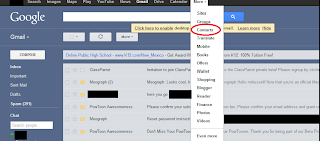
What I like about the Android is that you can control your groups and your phones address book right from your web browser. When signed into Google, usually for me I get to the menu from Gmail, you do the following:
1. Click MORE
2. Click CONTACTS
3. In the page that opens up, on the left hand column, click NEW GROUP
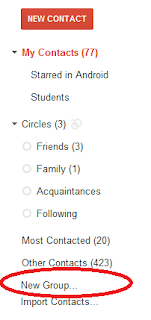 4. Name your group (when I'm starting the groups for my class, I usually do something like CLASS 1, CLASS 2, etc.).
5. Once you have your parents all in your normal contact list, which you can either do from your phone or also in your web browser (it's faster) once you've collected phone numbers, just click the box next to their name, click the add to group button, and add them to your group.
6. Repeat over and over again. Remember that you'll only be able to add 10 per group.
Now, the next time you send a text, when you search for a recipient, the Android system will give you the option of finding your groups.
It works for me, because I prefer to send my texts from my phone. If you have a smart phone, it's pretty much a given that you have unlimited texting (if you don't get it, you're being ripped off big time). I send a daily text letting parents know of important dates, homework, etc. I also send texts as needed to parents to let them know of behaviors, to praise students, etc.
My favorite part of all this is that I utilize a free app called Sms Backup + that will backup your call log and all of your text messages to your Gmail account as often as you would like. So what this means for the teacher is you have a record of parent communication, which is great.
I'm very up front with parents from the beginning. I tell them that I love text messaging, ask for their phone numbers, and the past two years, I've been sending texts to every single parent of every single student.
There are some services out there that you can use if you're worried about sharing your cell phone number with parents, or would like to send text messages from your computer. If that is more what you're looking for, I will refer you to a post Richard Byrne made on his Free Technology for Teachers blog titled 7 Services for Sending Group Texts to Parents and Students.
Now, I currently use an Android smartphone, and send my texts directly from it. Before my Droid, I had a Blackberry. The primary difference I noticed right from the start is that I could text all 52 parents (moms and dads, remember!) in one text on my Blackberry, but on my Droid, I'm limited to groups of 10 people. It is a little more of a pain, but what I did was I placed everyone into groups of 10, and when I sent a text, I would first send it to the first group, then forward it to the next group, etc. It would take about 45 seconds in all to get the text out to all groups.
What I like about the Android is that you can control your groups and your phones address book right from your web browser. When signed into Google, usually for me I get to the menu from Gmail, you do the following:
1. Click MORE
2. Click CONTACTS

3. In the page that opens up, on the left hand column, click NEW GROUP
 4. Name your group (when I'm starting the groups for my class, I usually do something like CLASS 1, CLASS 2, etc.).
5. Once you have your parents all in your normal contact list, which you can either do from your phone or also in your web browser (it's faster) once you've collected phone numbers, just click the box next to their name, click the add to group button, and add them to your group.
6. Repeat over and over again. Remember that you'll only be able to add 10 per group.
Now, the next time you send a text, when you search for a recipient, the Android system will give you the option of finding your groups.
It works for me, because I prefer to send my texts from my phone. If you have a smart phone, it's pretty much a given that you have unlimited texting (if you don't get it, you're being ripped off big time). I send a daily text letting parents know of important dates, homework, etc. I also send texts as needed to parents to let them know of behaviors, to praise students, etc.
My favorite part of all this is that I utilize a free app called Sms Backup + that will backup your call log and all of your text messages to your Gmail account as often as you would like. So what this means for the teacher is you have a record of parent communication, which is great.
Subscribe to:
Posts (Atom)