Showing posts with label research project. Show all posts

Wednesday, April 24, 2013

5th Grade Science Fair Projects

Now that we're approaching the end of the school year, it's time to get the 5th graders working on their science fair projects.

I think it's a great end of year project to do, because it gives students a chance to show off the knowledge and skills they've acquired during the school year. We will be presenting these projects to families and community members in about 3 weeks time.


I look forward to showing off some of the exemplary (and even not so exemplary) projects here on the blog, but for now, I'm going to list some resources for anyone out there who is thinking about doing science fair projects. So here you go:

HERE ARE THE TWO MAIN RESOURCES I AM UTILIZING:
  • Elementary Science Fair Planning Guide: I consider this to be the best resource I came across online. In fact, the document I created for my 5th grade is based on pages from this pdf document.
  • My Science Fair Document: I made some changes to the document listed above, and added my own things to it. This is what we're using for our science fair.

Tuesday, November 13, 2012

5th Grade Social Studies Fair Projects: A Great Presentation Based Project

Next up in a growing line of project based research and presentations that are based around social studies will be the schools 5th grade Social Studies Fair. I've been doing the social studies fair for my entire career, and this is the first year that my colleagues in 5th grade will be joining me for this great project.

We've already done two presentation based projects this year, the 50 States Presentation, and the just finished Famous Individual Presentation. Both projects involve a ton of research and synthesis, and the major burden of work and learning on these projects falls on the shoulders of the students. These are great because while I consider them "social studies," they involve reading and writing, and are multi-disciplinary to the point that I had students working on them at all different times during the school day.

I am again going to ask students to cite sources and complete a bibliography in the APA format. I had a few parents who looked at me like I was crazy when I told them that their children would be completing APA reference pages, but they have done them, and done them correctly, so we're moving forward. I have already posted some great Research Project Resources that can get any teacher started with having students research appropriately and go the extra mile in documenting their research in any area.

This project mimics the presentations that students all over the world do for Science Fairs. Students will be purchasing a science tri-fold board, and either working alone or with a partner to complete their project board.

This project was left pretty open ended. First, I explained the emphasis of this project, either history, culture, invention, geography, or ideas. Students were not allowed to do a state, the cultures we have already studied, or any famous individual that was researched for the last project. Topics range from the history and evolution of computers to research about Pearl Harbor. I make it a point to push students in the direction of topics that aren't too broad, but not too obscure, they need to be able to find sources out there.

When the day comes for the presentations, students will be setting up, again in Science Fair format. We'll set up all the poster boards, and will invite guest to join us. Other classes from the school, parents, the community, and dignitaries will be invited to view their great work. Each student or pair of students will create some note cards to guide them in the presentations they will be making numerous times on the day of the Social Studies Fair.

I have included photos of two poster boards done last year. I will post some of the ones that will be done this year (we just began work today), they should be a little more in depth than what I had my students do in previous years.


Finally (and what 99% of you are here for), I have the documents for download:

SOCIAL STUDIES FAIR PROJECT (pdf): This document is what we're using. If you like what you see, I recommend downloading all of these documents in the zip file below so that you can modify it in any way you see fit.

SOCIAL STUDIES FAIR PROJECT ZIP FILE (this file contains all the pages of the above pdf in .doc format.

Please check back around the second week of December when I will post some of the students finished work and pictures from the social studies fair.


Friday, October 5, 2012

5th Grade Teacher Simple Research Project Resources

I expect my 5th grade students to be able to produce on topic, appropriate, properly cited research early on in the school year.
Yes, I know that there are many college students who can't do this, but that's not really my problem, or yours. When you get right down to it, research really isn't that difficult, it's just another process to teach and practice until it gets done correctly.

The type of research I'm talking about here is non-scientific, I'm talking about basic research on a topic in social studies, literature, etc. It's all about gathering information, deciding what's important, and presenting that information in an efficient manner.

The following documents are for any teacher who is ready to get their students researching: 
  • SIMPLE RESEARCH RUBRIC (pdf or doc): This rubric is good for pretty much any type of topic research. 
  • BIBLIOGRAPHY CARDS (pdf or doc): These cards are great for teaching students how to track their sources and how to cite them in a proper APA style bibliography. I've seen graduate students not know how to do this, but it's ok, 5th graders can, you just have to demand that they do it.
  • BIOGRAPHY HELP PAGES (pdf or doc): I've previously shared this packet in my Famous Individual Project post. This can come in handy to anyone doing any type of biographical research.
  • STUDY SKILLS ACTIVITY BOOK: NOTE TAKING (pdf): I also shared this source in my Famous Individual Project post. It's a great packet of activities that help students learn how to find and pull sources, what is important and not important, and how to cite different sources. This is seriously a gold mine!
You are free to take these documents and change them for your own needs (with the exception of the study skills book, that one isn't mine). Just remember, it's all free, and should remain as such.

Thursday, October 4, 2012

Famous Individual Project: A Great 5th Grade Research Project With Tons of Activities and Rubrics

Recently, our students in 5th grade completed their first oral project presentation of the year, presenting their individual state posters, the project they did in the 50 states unit,
in front of other students. We asked students to dress for the occasion, and graded them on everything from their posture, the volume of their voice, and the way they dressed. This ended up being a great experience, and we've decided to build on that during the school year.

Next up, we will be doing a Famous Individual project. In this project, students will be completing research on a famous individual of great character. They will be analyzing their individual according to the 7 Habits of Highly Effective People, a program that my school began following this year. Below you will be shown the requirements for this project, including links to all necessary forms. To download everything in one packet, click here:


This project will ask students to:
  • Choose a famous individual, either living or dead, who is not fictional. Once they have chosen their famous individual, they must complete the Justification Page to explain why they believe their individual showed good character and lived a life that benefited others. 
  • Once the students has successfully justified why they have chosen an appropriate person for this project, they will begin research. Students will be taught how to properly cite sources and create a bibliography (this is a big step for 5th graders, but they can do it). First students will learn how to take notes and keep track of sources. I came across a great packet online to help with Note Taking that I will be utilizing. They will use the blank bibliography cards to cite sources, and then will be given the biography outline packet, which will guide their research. Students research papers will be scored based upon the 5th grade research paper rubric.
  • Next, students will be creating a computer based presentation that will supplement the speech they will be giving. We will be doing these presentations in the computer lab with the assistance of our schools computer lab instructor. They will be scored on their computer presentation based on the computer presentation scoring rubric.
  • Finally, in the final step of this project, students will create a short speech to go with their computer presentation, and they will be presenting these projects before other students, parents, and community members. The speeches will focus on the character of their person, their major accomplishments, and how they fit the 7 Habits. The speech will be scored based on the oral presentation scoring rubric. 
I am very excited to see our students continue to step up. They did a great job on the 50 state projects (as you can see HERE), and I expect great results on this project. 

I have all of these forms available in Microsoft Word format, if you would like any of them, please let me know and I'll get them to you. As always, this is available freely, I believe that teachers should share our resources with one another free of cost if at all possible, and will continue to share everything I make without cost to anyone.

Friday, September 21, 2012

Completed 50 State Project State Strips

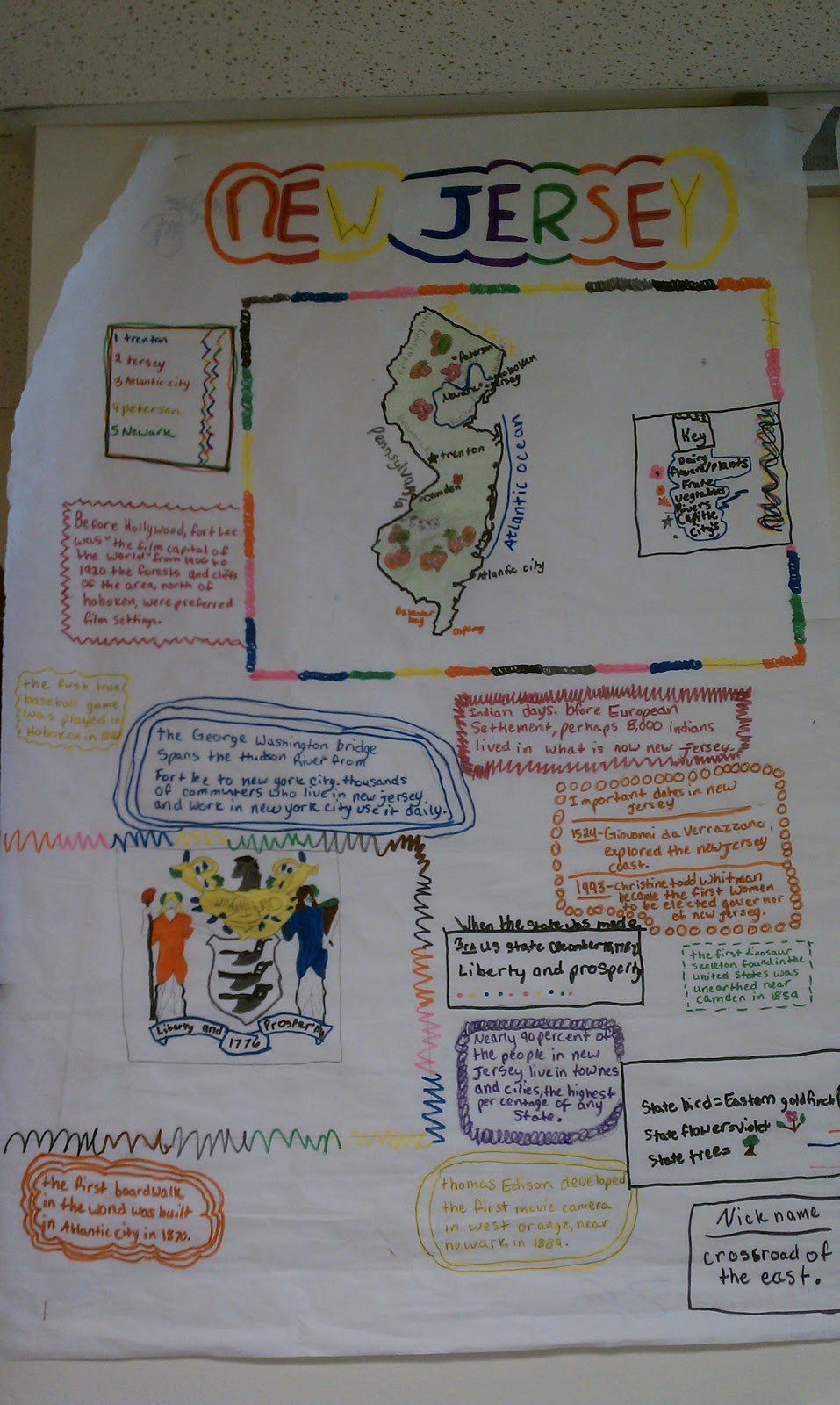
My class just finished their state projects, called State Strips. You can find the information on this great research project on two posts I've done, both Teaching the 50 States, and 5th Grade State Research Project: State Strips. You can access the project guidelines for this great research project here (pdf format or docx format). 

Now that the project is completed, students have also taken the time to present their posters in class. I had students prepare a 1-2 minute long speech in which they taught other students about their state. The exemplary posters were then posted in the hallway. My students love seeing their work in the hallway (and on this blog), so I'm going to show some of the great examples below. Click on any image to see a larger version. 


Monday, September 3, 2012

5th Grade State Research Project: State Strips

Like most teachers, I must adapt from year to year to the needs of my students. Although my 9 week plan for the year in Social Studies states that I like to do a unit on United States Geography (states and capitals) after Unit 5, this year I encountered a group of students who don't have a large background in United States geography (I blame high stakes testing, but alas, I must move on). As it's important information, at least on the surface, to learning United States history, I decided to do this unit now, before getting into United States history. This Unit on Geography focuses heavily on naming and identifying the 50 states, and a basic beginners level understanding of World Geography. By clicking on the links above, you can be taken to various resources that can assist you.

This is how it will look in my classroom:

First off, I will print off a large 3 foot by 3 foot wall map of the United States, have student help cut it out, and post it on a bulletin board in the classroom (get this from MegaMaps). As each student finishes their project, they will go and write the name of their state, and color in their state on the map.

Each student will be provided with a 3 foot by 2 foot strip of butcher paper in which to complete their project on (butcher paper is 3 feet wide, so just measure out 2 foot strips and cut).

Following the PROJECT GUIDELINES (pdf format or docx format), students will have exactly one week to complete their project, which is titled "state strips." The example in the guidelines is just something I drew up, and is nothing fancy. I make it a point to not provide them with anything too specific, because I want to see what they're capable of doing.

Sunday, September 2, 2012

Our Completed Pre-Columbian History (Maya, Inca, Aztec, Navajo) Project Posters

My class just finished our major Unit 1 Social Studies project on Thursday, and have placed the posters out in the hallway. Unit 1 is on Pre-Columbian history, and it is entirely student driven, with a project based learning project that is done in groups. Just a short 13 days into the school year, my entire class is loving Social Studies, because they get to determine their own learning within the topic of study.

Here are the guidelines and links for Unit 1, which is highlighted mainly by information on the Maya, Inca, Aztec, Navajo.

The posters themselves are great, because they're simple in nature, yet get students to work together according to the project guidelines (that document is available HERE).

Check out their great posters that are now available for viewing in the hallway outside our classroom:


Sunday, July 29, 2012

World at War (World War I and World War II) Classroom Project

When I teach my 5th grade unit on the World Wars, we discuss World War I, the Great Depression, and World War II. As with each unit I teach in Social Studies, I always end with a project. In this case, it is a two part project. Students first complete a 3 dimensional display with research paper about an event from either World War I or the Great Depression, and then the entire class makes a hallway display World War II timeline. Each student is responsible for one event to place on that timeline.

I have completed and placed in my Google Drive the student information sheet for this entire project, with scoring rubrics.

Access the World at War project information sheet:

Monday, July 2, 2012

Make A Voki

The website Voki offers students the chance to make a talking card of sorts. I have students use this website numerous times during the school year to analyze literary characters, major historical figures, etc. Making a Voki is simple, just head on over to the website, and click the "create" button, and you're on your way.

Once the creation page comes up, click the buttons to change your character, customize the background, voice, even the dimensions of their features. Watch your spelling when typing in the text they'll read aloud.

Just remember, you need to embed the code into your blog, website, or even a document to ensure it's saved before you close the web browser when you're finished, or you'll lose your work! If you have a user account, your Vokis will save there. Check out my Voki. It took me about two minutes to make this. 


Saturday, June 30, 2012

All About Our City: Las Cruces

With this post, I think I pretty much let the cat out of the bag on the fact that I live in Las Cruces, New Mexico. I've lived here since 2000, and love this great little city in southern New Mexico. So for my students, this means that you'll spend some time during the school year learning about Las Cruces and the Mesilla Valley. We will study Las Cruces and the Mesilla Valley as it is now, and the history of the area.

When studying Las Cruces and the area, you'll need to first focus on some facts. Let's start with demographic information. What I mean by demographic information is data about certain portions of the population. In kid words, I mean that we need to find facts about people living in Las Cruces (like how much money they make on average, or what percentage finished college, etc.). Use the following websites to find some good demographic data about Las Cruces:

Sites with demographic facts about Las Cruces:
Hopefully you notice right from the start that the data you find one each of these sites isn't the same. Why might this be? It's because some of the data is older, and some of it is just estimations while others are based on certain studies. Look for the numbers to be close to know that they're correct.

Next up, let's learn about the history of the Mesilla Valley. Use the following websites to find some good historical facts about the area:

Sites with historical information about Las Cruces and the Mesilla Valley:
Finally, we're going to use this information to create a profile of the area. I made a video about eight years ago that showed historical photos of the area alongside newer photos of the area. Using the Rio Grande Historical Collections, we are going to find photos that we can match to their current locations. I will make a trip to take photos of what these areas look like now, and we will make an updated version of this video, which I will then post to this blog (how fun!). 

Using your information, as well as some photos from the collections linked to above, you have a few options:

1. Head over to Prezi, and create a 15+ slide presentation about the area. 
2. Create a 15+ slide Animoto about the area.
3. Print the information, and make a poster board with at least 10 facts and 5 photos.
4. Write an 8+ paragraph research paper synthesizing your findings. 

Finally, we are going to create a large reproduction of a map of Las Cruces and Mesilla, and place some major landmarks on it. These landmarks include: our school, city hall, NMSU, the district, magistrate, and county court houses, Mesilla Plaza (and in Mesilla Plaza, La Posta, Fountain Theater, abnd San Albino Basilica), downtown, five restaurants, five favorite places of entertainment, and ten major roads).

We are going to use Google Maps, and will project this map of Las Cruces on the board for everyone to see. 

Friday, June 29, 2012

Prezi For Presentations: Goodbye PowerPoint!

PowerPoint has been around since I was a kid. I remember doing my first PowerPoint presentation when I was in 6th grade, way back in 1992. It wasn't a very user friendly experience, but it was definitely groundbreaking. Sadly, it's not as exciting anymore, or as the kids might say, it's "played out" (do kids still say that?)


Now my students use Prezi. I have signed up for an educator account, and my students build their Prezi's under my account name. It's a fantastic update to the PowerPoint model. As they build slides, they are given a linear view to the side, but they can manipulate the space that the slides are in, making them bigger, smaller, turning them at weird angles. As the slideshow progresses, it zooms and flips around. It can be a little unnerving if you have problems with fast moving things, but students just love it.

In my class, students use Prezi to make presentations based on books and characters in reading class, present research in social studies, and to present concepts in both math and science. It's a great tool, it's easy to teach, and the students love it. Try it out!

I've included a Prezi here for you to see. This one was made by my son this past year while he was in 4th grade. He did this without me showing him anything but the absolute basics:


Monday, June 18, 2012

American Revolution Video Project

Each year, my students are asked to create a small video based on one of the major events of the American Revolution. I have included a quick overview in this document. These topics include, but aren't limited to:


- Boston Massacre
- Boston Tea Party
- Signing of the Declaration of Independence
- Battle of Bunker Hill
- Battles of Lexington and Concord
- Shot Heard Around the World
- The Stamp Act
- First Continental Congress
- Signing on the Treaty of Paris


I have the class begin by splitting up into groups of no more than four (this could change depending upon class size). I like to have at least five of the above topics included in the final product. After each group conducts research and films their video, all of the videos are edited together, relevant clips from Youtube videos that give an overview of each topic are added, as well as music and titles, and we have a great classroom project.


Let's begin by looking at some places to get some great, kid appropriate research:


TimeRime timeline of the American Revolution (a great interactive timeline about 10 major events of the Revolutionary War)


The Chronicle of Revolution (PBS.org) (a site that includes tons of information on topics relating to the American Revolution)


Teaching American History (interactive lessons divided into chronological sections; 1775-1778, 1778-1781, and the Treaty of Paris in 1783)


National Archives pictures of the Revolutionary War (the best source I've found for images about the Revolution)


Revolutionary War Animated (animated battle maps from the Revolutionary War)


Now that we have some resources, we can move on to the content itself. Here are a few videos that really get the kids going and thinking about this great topic in American history:


Too Late to Apologize: A Declaration - This video is a spoof of the One Republic song "Too Late to Apologize," and is the single favorite thing that I present to my students each year, they LOVE this video.


A Schoolhouse Rock song about the Shot Heard Around the World

John Adams (HBO special) Boston Massacre scene: It's a little bloody, but very to the point in presenting the brutality of this event.


Obviously there are thousands of videos on Youtube and elsewhere on the internet that you can use, these are just a few that I have found kids to really enjoy and understand easily.

I hope this is enough to get any teachers interested started, or at least hopefully there are a few resources here that you can use.